Exporting Client Reports
What this is for, in one sentence: Report Export turns a client’s data into the branded, six-page “AI Visibility Audit Report” PDF you hand to clients and leadership — with pre-render checks that stop bad data from ever reaching a document with your name on it.
When to come here:
- Monthly reporting, pitch follow-ups, QBRs — any moment the work has to become a document
- Right after a strong period, while the numbers make your case
- Before a renewal conversation: the Game Plan page is your “what’s next” in writing
For Marcus Tan, the export is the highest-stakes surface in the product — nothing else he does in Zicy is seen by a client, but this PDF carries NorthStar’s logo into a boardroom. Every upstream number ends up here, which is exactly why this surface got the heaviest guarding in the product: the report you send is the report your agency is judged on.
Customising the report
Section titled “Customising the report”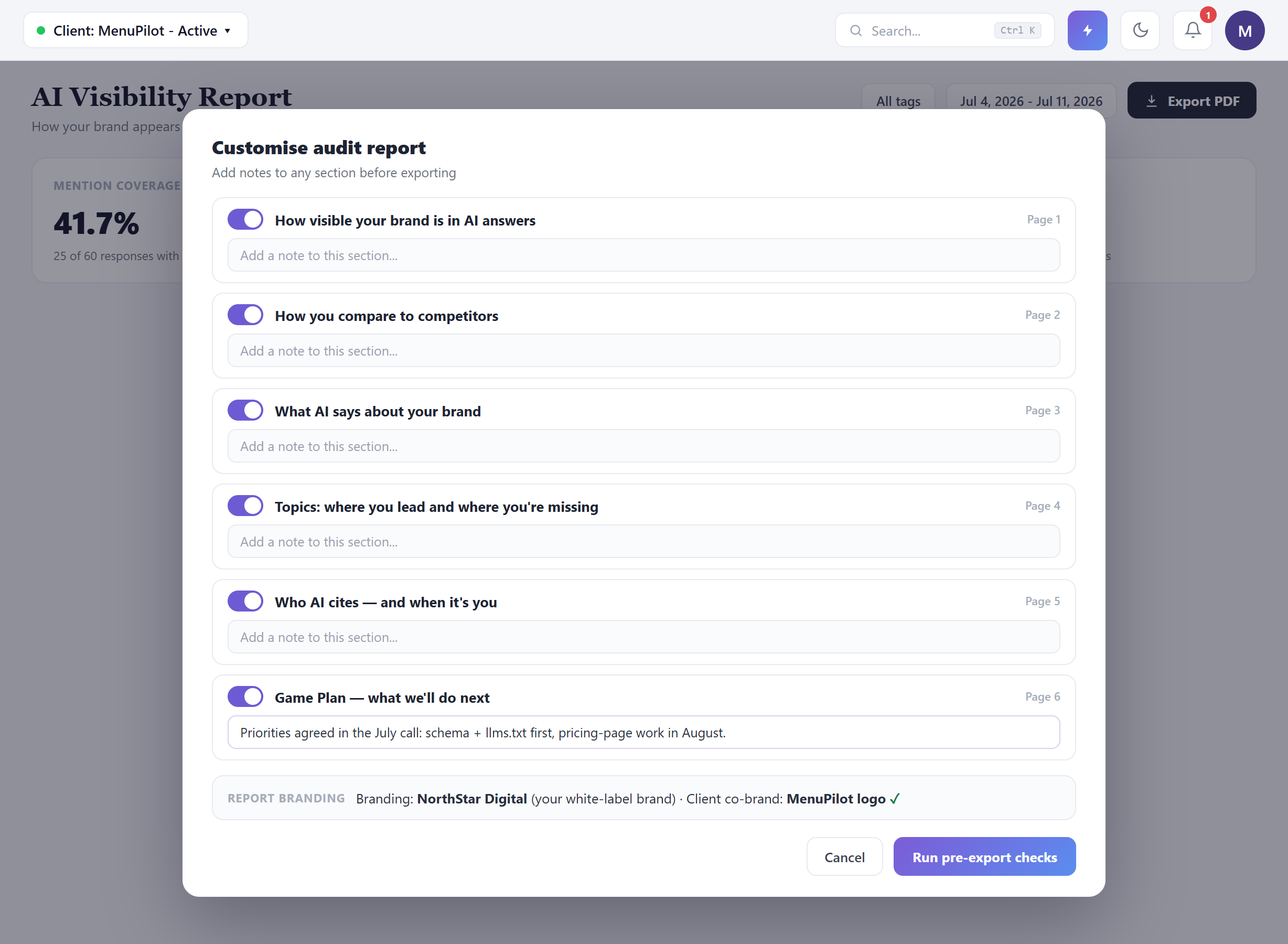 The report follows a six-page arc, and the modal lets you shape it per client: toggle sections, and — the underrated feature — add a custom note to any section. The section titles are written for the person who’ll actually read them (“How visible your brand is in AI answers”, not an acronym), and the arc runs measurement → comparison → perception → topics → citations → Game Plan.
Use the custom notes deliberately, because they’re where the agency earns its margin. The numbers are generated; the meaning is yours. A note like “Priorities agreed in the July call: schema and llms.txt first, pricing-page work in August” turns a data page into an account narrative — decisions, sequencing, the reasoning a dashboard can’t carry. The clean division: the product owns the numbers; you own the story. Notes are for interpretation and commitments, never for restating (or arguing with) the data beside them.
The branding block confirms what the client will see before anything renders: your white-label brand, plus the client’s own logo as a co-brand. Configured once in Settings (see Team, Settings & White Label), confirmed here every time.
The pre-export guard
Section titled “The pre-export guard”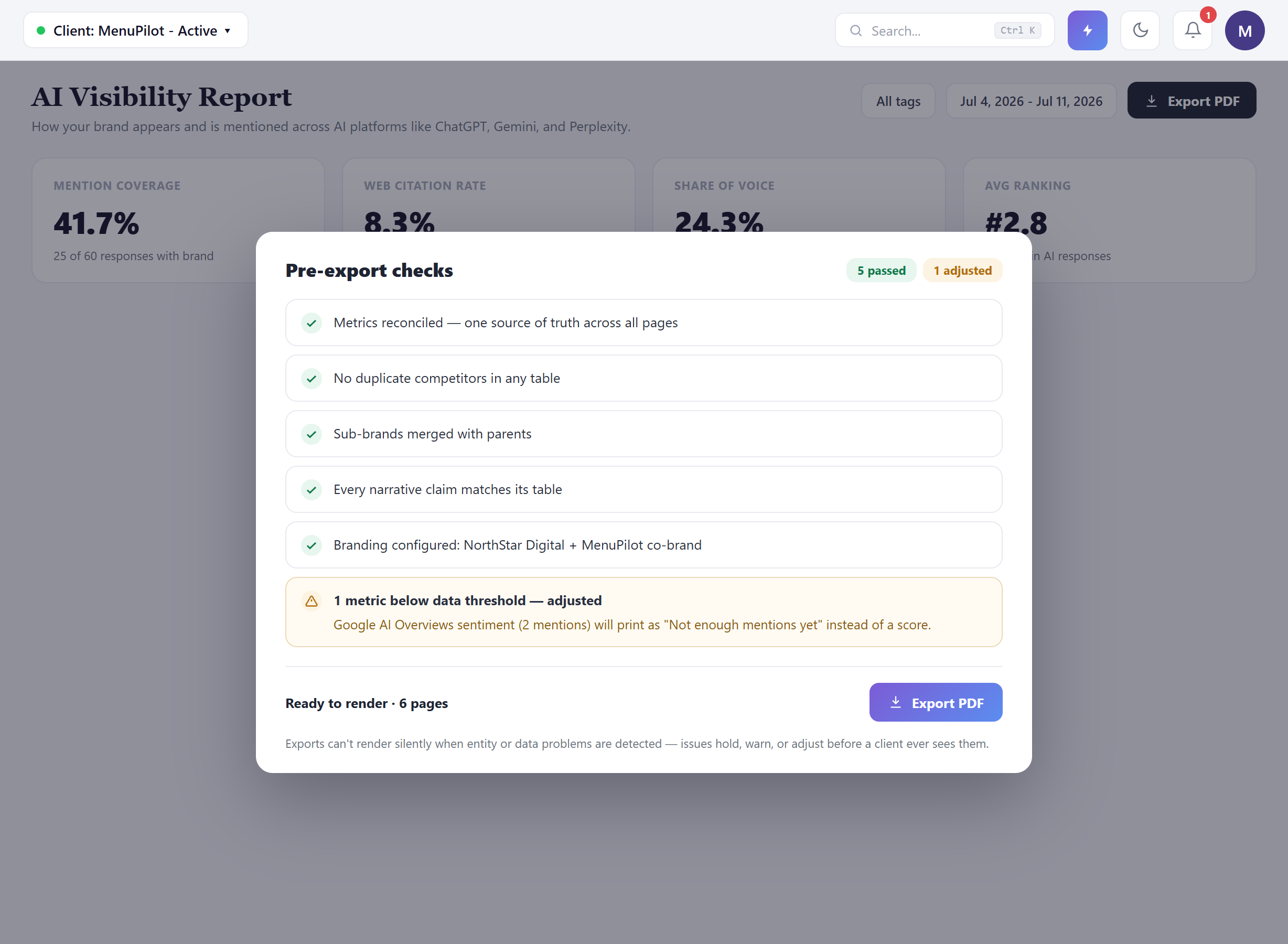 Before a single page renders, the export runs its checks — and this screen is your professional-liability shield, so read it rather than clicking through it. What it verifies: metrics reconciled to one source of truth (the number on page 1 is the number on page 4), every narrative sentence validated against the table it sits beside, and branding configured. It also surfaces data and entity issues it can spot — a thin-data platform, or a competitor entry that looks like a possible duplicate or sub-brand — and flags them for your review before rendering rather than after a client raises them.
Then there’s the honest part. In this run, one check came back adjusted rather than passed: Google AI Overviews sentiment sits on only 2 mentions this period, so the report will print “Not enough mentions yet” instead of a sentiment score. That’s the product declining to dress up a statistically meaningless number as insight — in a document your client keeps.
Let the adjustment stand. The temptation is to see an amber line and want it gone before the client does. Resist it. “Not enough mentions yet” is a defensible sentence in a QBR; a sentiment score built on 2 mentions is not — and a client who later learns the difference remembers who showed them the dressed-up version.
The footer states the policy plainly: exports don’t render silently when data problems are detected — issues hold, warn, or adjust before a client ever sees them. The count at the top (“5 passed · 1 adjusted”) is the summary you can quote if anyone asks how the report is quality-controlled. On the entity side, treat the guard as a second pair of eyes rather than a guarantee: it flags what it can, but if you know a client has sub-brands or look-alike competitors, glance over the comparison page before you send.
What the client receives
Section titled “What the client receives”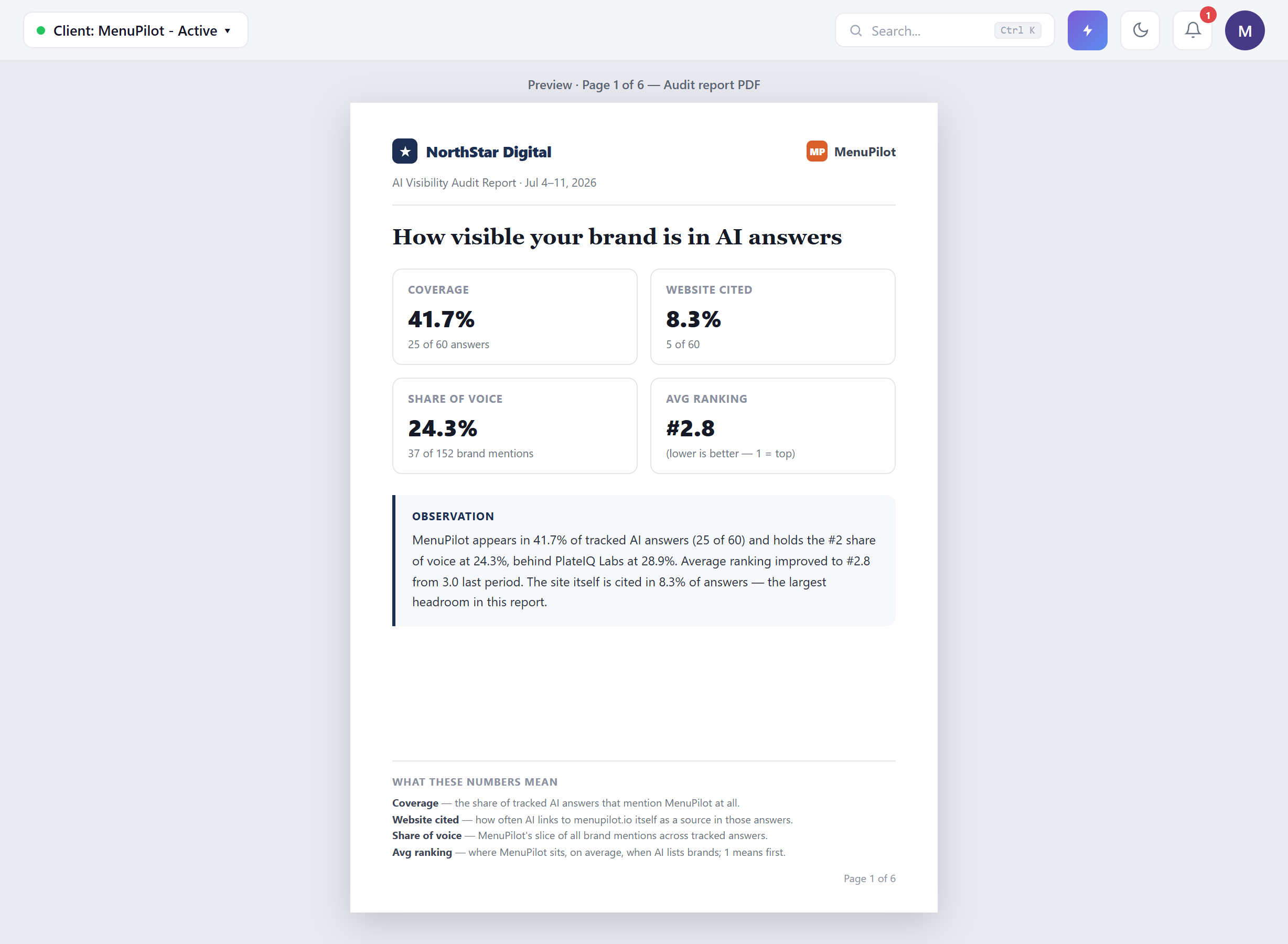 Page 1 sets the pattern for the whole document. Your brand in the header, the client’s logo opposite, the period stated. Four metrics with their working shown — coverage 41.7% is “25 of 60 answers”, share of voice 24.3% is “37 of 152 brand mentions”, and average ranking carries its own direction label (“lower is better — 1 = top”) so nobody misreads #2.8.
The Observation block is generated narrative, and every clause in it is grounded in a number on the same page or in the tables behind it: the coverage figure, the share-of-voice position behind the named leader, the ranking improvement from last period, and the one candid line — the site itself is cited in 8.3% of answers, “the largest headroom in this report.” A machine-written paragraph that includes the weakest number is a paragraph you can defend.
The footer glossary (“What these numbers mean”) defines each metric in one plain, correct sentence. Leave it in. The exec who receives this report forwards it to someone who wasn’t in the meeting — the glossary is for that second reader.
The report reflects the period you selected, not the work you did yesterday. Fixes shipped late in a period may not be visible in AI answers yet — there’s a lag between publishing a change and AI systems picking it up. If you shipped major work this week, say so in a section note rather than expecting this period’s numbers to already show it.
Common questions
Section titled “Common questions”Can I edit a number before exporting? No — and that’s the feature. The guard exists so that every figure in the PDF traces back to the same source of truth as the dashboard. What you control is the narrative: section notes, section selection, and the Game Plan.
What’s the difference between a check that fails and one that’s adjusted? An adjustment means the export proceeds with a safer rendering (like “Not enough mentions yet” in place of a thin-data score). Issues the product can’t safely adjust will hold the export or warn you before rendering — either way, nothing broken reaches the client silently.
Does the guard catch every duplicate competitor or sub-brand? It flags the ones it can identify, and that catches a lot — but entity reconciliation in exports is still being sharpened, so it isn’t a guarantee for every case. If a client has sub-brands or competitors with look-alike names, review the comparison page yourself before sending, and fix the competitor set in Competitive if something’s off.
When will the adjusted metric print as a real score? When there’s enough underlying data for the score to mean something. For a low-mention platform, that resolves as coverage grows — check the platform’s mention count in Brand Sentiment to see where it stands.
Will the client see any Zicy branding? The report renders under your white-label brand with the client’s co-brand — that’s what the branding block in the customise modal confirms before every export. Set it up once in Team, Settings & White Label.
Six pages feels long/short for my client — can I change it? Yes — section toggles control exactly which pages render, and the page count updates before export. A pitch follow-up might run three sections; a QBR usually earns all six.
What to read next
Section titled “What to read next”- Team, Settings & White Label — where the branding this report renders under is configured, once.
- Competitive — the source of the comparison table behind page 2, and the place to fix a competitor set before it reaches a client document.
- Brand Sentiment — the module behind “What AI says about your brand”, including the per-platform mention counts that drive the guard’s thin-data adjustments.