Visibility Gaps
What this is for, in one sentence: Visibility Gaps is the prioritized to-do list every diagnosis in the product flows into — technical fixes, content upgrades, and new content opportunities, each sized, explained, and ready to hand to whoever does the work.
When to come here:
- After any audit or analysis, to see what it produced as actionable work
- When planning a client’s month: this list is the raw material for a work plan
- When someone asks “so what do we actually do about our AI visibility?” — this screen is the answer
Marcus Tan runs NorthStar Digital, and his product isn’t dashboards — it’s outcomes his clients pay monthly for. For the agency, this screen is the bridge between the two: diagnosis on one side, a scoped, prioritized, delegable backlog on the other. For MenuPilot, one of NorthStar’s retainer clients, that backlog currently holds twelve items.
Reading the backlog
Section titled “Reading the backlog”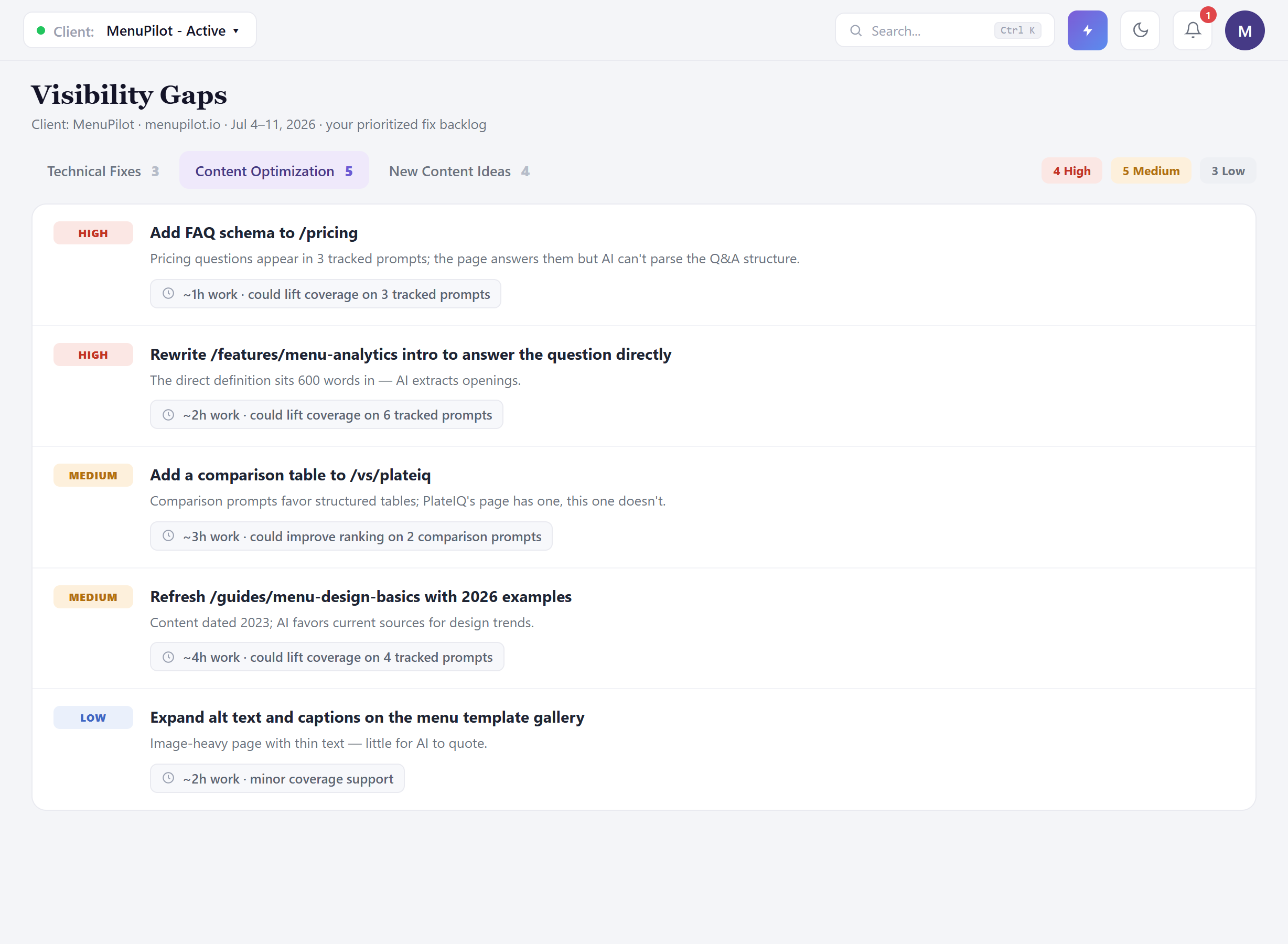 The header confirms which client you’re working (the client indicator — agency accounts speak in clients, not profiles), and the three tabs split the work by kind: Technical Fixes (3) — things wrong with the site’s AI-readability; Content Optimization (5) — existing pages that could earn more visibility; New Content Ideas (4) — pages that don’t exist yet but should. The priority chips summarize across all three: 4 High, 5 Medium, 3 Low. The module goes by the same name — Visibility Gaps — everywhere it’s referenced, on the dashboard, in the nav, and in the findings that route here, so there’s one screen to point people to.
Look at what each card gives you, because the details are what make this a backlog rather than a report:
Every title is specific enough to be a ticket. “Add FAQ schema to /pricing.” “Rewrite /features/menu-analytics intro to answer the question directly.” No two items share a title; each one names the page and the deficiency, which means each one can be assigned, tracked, and closed without a meeting to explain it.
Every card says why. The FAQ-schema item isn’t generic best practice — it exists because pricing questions appear in three of MenuPilot’s tracked prompts and the page’s answers aren’t machine-parseable. The reason line is the difference between “an SEO tool told us to” and “here’s the tracked demand this serves.”
Every card is sized in plain terms. “~1h work · could lift coverage on 3 tracked prompts.” Effort in hours, impact in tracked-prompt terms — the two numbers an account director needs to sequence a month and a client needs to approve one.
What the sizing is for
Section titled “What the sizing is for”Add up the visible cards and MenuPilot’s backlog is roughly fifteen hours of itemized, justified work — and for an agency, that sentence is the whole point. This list converts directly into:
- A monthly work plan: Highs first, and within them, cheapest-per-impact first — the ~30-minute llms.txt item and the ~1h schema and FAQ items land before the ~4h content refresh.
- A scoped client conversation: each line item carries its own rationale and its own expected effect, so the retainer isn’t “AI optimization work” — it’s twelve named deliverables with reasons attached.
- Delegation without translation: titles are tickets; reasons are context; nothing needs a strategist to re-explain it to the person executing.
Honest guidance — estimates are estimates. The effort figures are sizing aids, not quotes. Scope the item against the actual site before you commit hours to a client — a “~1h” schema fix on a heavily customized CMS can triple. And impact lines say could deliberately: they identify which tracked prompts an item serves, not a guaranteed lift. Promise the work and the measurement, not the number.
The technical tab: where audits land
Section titled “The technical tab: where audits land”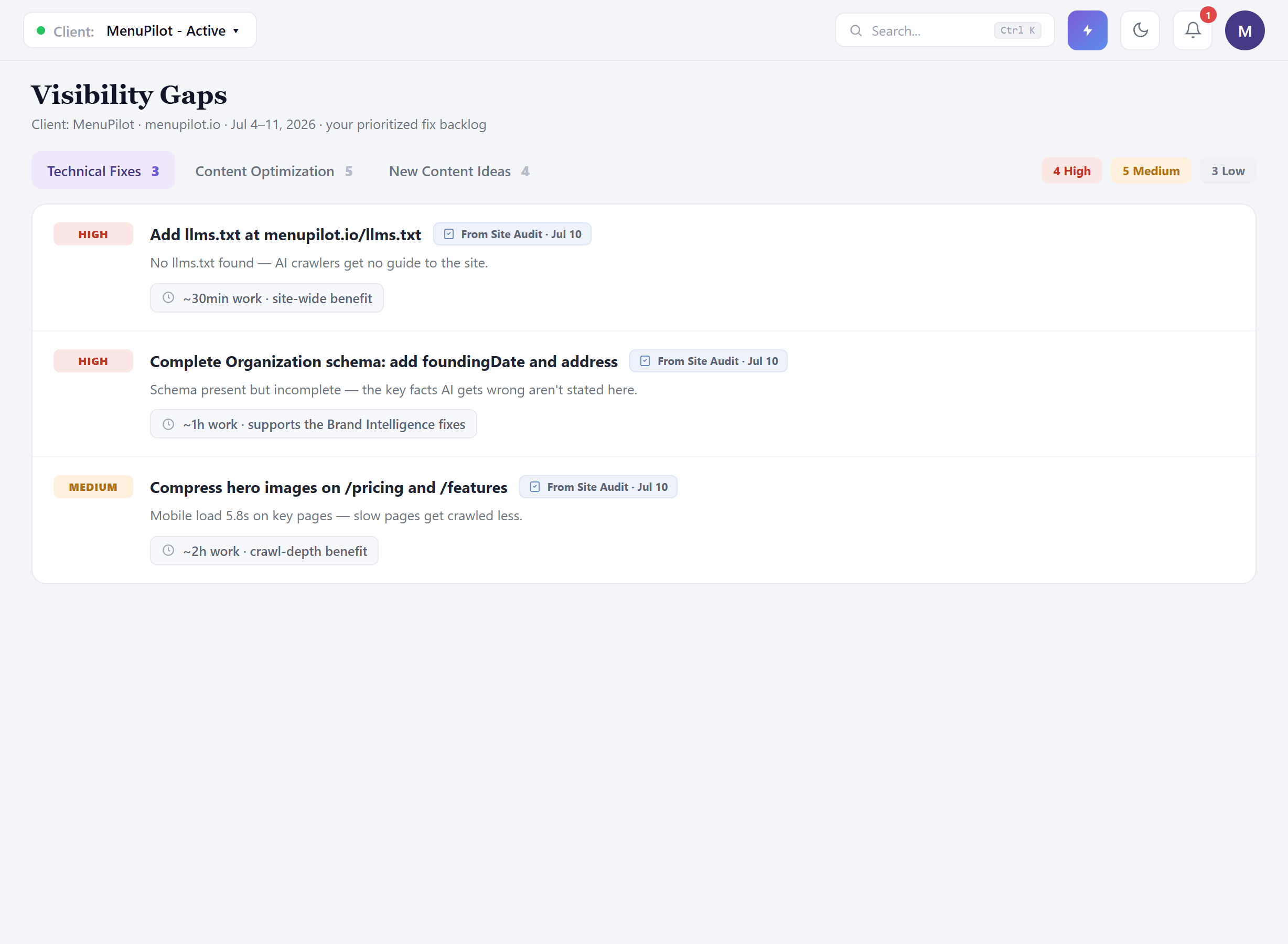 Every technical item carries its provenance — “From Site Audit · Jul 10” — so the backlog is traceable: nothing appears here without a finding behind it. MenuPilot’s three: the missing llms.txt (thirty minutes, site-wide benefit — do it first), incomplete Organization schema, and heavy hero images slowing mobile crawl.
The schema item is worth pausing on, because it’s two modules telling one story: Brand Intelligence found AI asserting a wrong founding year and location for MenuPilot; this card is the site-side fix — the facts AI keeps getting wrong aren’t machine-readably stated where AI looks. Confirm the gap there, fix the source here, and the same edit serves both.
Items can also arrive from Brand Intelligence directly — the “Add to fix list” action on a confirmed gap routes it into this backlog — so over time this screen becomes the single queue for everything the diagnose modules surface.
A new client’s first visit
Section titled “A new client’s first visit”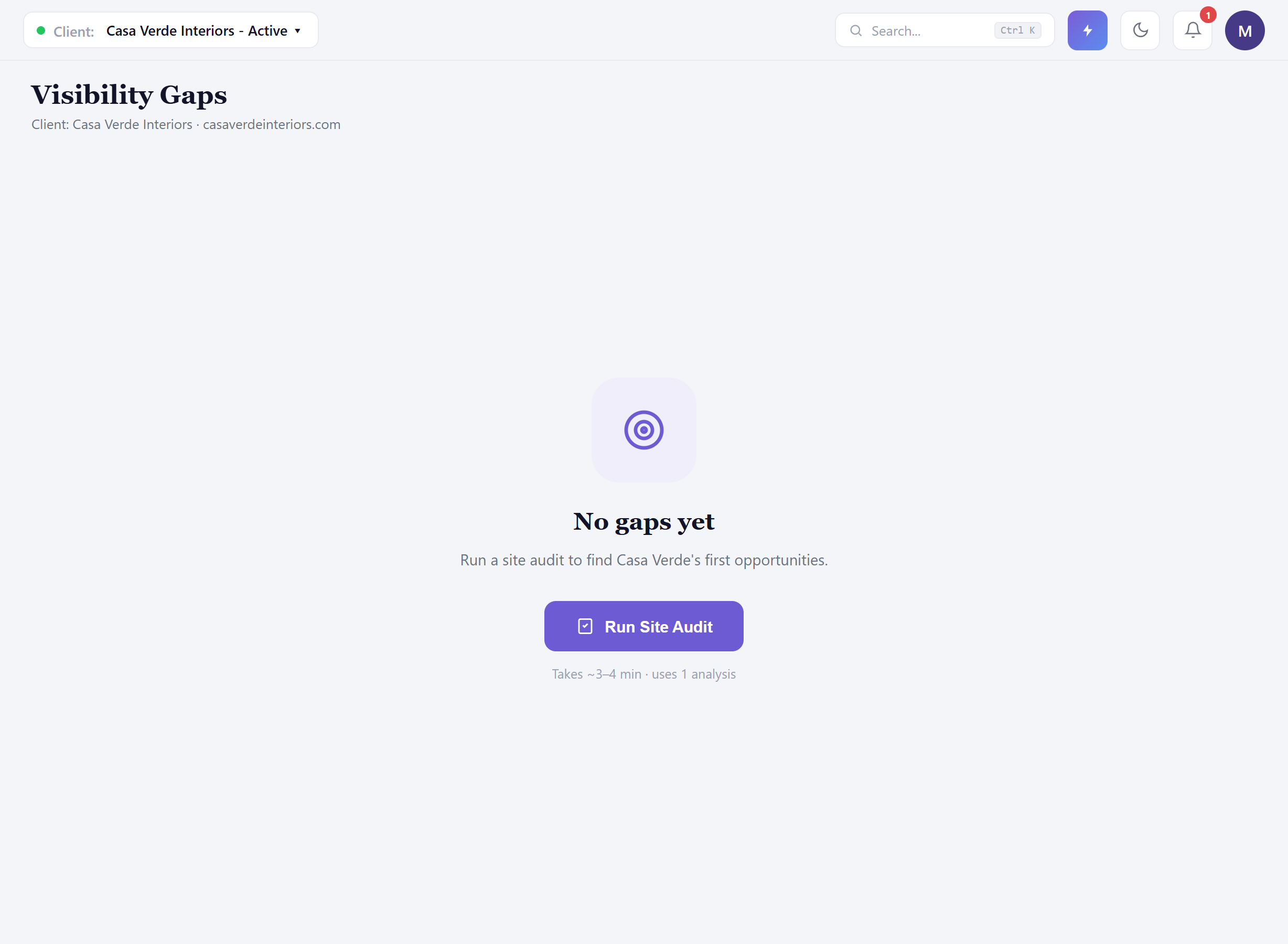 Switch to a just-added client — Casa Verde Interiors — and the module is honest about why it’s empty: no diagnosis has run yet, so there’s nothing to prioritise. It doesn’t leave you guessing at that — it names the first step and its cost: Run Site Audit, ~3–4 minutes, uses 1 analysis. One click, known cost, no dead end. For an agency onboarding a client, that’s the first-day motion: add the client, run the audit, and walk into the kickoff call with a populated, prioritized backlog instead of a promise to have one.
Honest guidance — an empty tab isn’t an error. Once populated, a category can still be legitimately empty — technical checks can simply all pass, and content ideas generate from analysis runs. The tab will say which situation you’re in — nothing diagnosed yet, or diagnosed and clear — so read the explanation before assuming something’s broken.
Honest guidance — twelve items is a menu, not a mandate. Sequence by tier and dependency: cheap site-wide fixes first (llms.txt, schema), then the content items serving the most tracked prompts, and let Low items wait for a quiet week. Shipping everything at once also destroys your ability to attribute what worked — stagger, measure, then continue.
Common questions
Section titled “Common questions”Where do items come from? Three sources: site audits (technical), content analysis of your tracked pages (optimization and ideas), and confirmed gaps escalated from Brand Intelligence via “Add to fix list.” Each item shows its source, so the backlog stays auditable.
How do I verify a completed item actually worked? Two loops: re-run the site audit to confirm technical fixes landed, then watch the metrics the item’s impact line named — coverage on those tracked prompts, ranking on those comparison prompts — across the following periods. Effort is verified in days; impact in weeks.
Can I show this list to a client? It’s built to be shown: plain-language titles, reasons, and sizing. For a standing deliverable, fold it into the exported report (see Exporting Client Reports) rather than screen-sharing the tool.
Why is my New Content Ideas tab empty when the others aren’t? Ideas generate from analysis runs; a fresh client or a just-changed prompt set may not have produced them yet. The empty state says why and what triggers generation — it’s a timing state, not a failure.
High priority on everything was the old joke — how are tiers assigned now? From impact and effort together: what an item touches (how many tracked prompts, site-wide vs one page) against what it costs. You’ll see all three tiers in normal use, which is what makes the High tier mean something.
What to do next
Section titled “What to do next”- Site Audit — the source of the technical tab; run it per client, per site change.
- Brand Intelligence — confirm fact gaps there, then route them here with “Add to fix list.”
- Action Center — execute directly: llms.txt and schema generators, and drafting for the content items.
- Exporting Client Reports — package the backlog and its progress into the client-facing document.