How to Write Tracked Prompts That Actually Work
Who this guide is for: anyone setting up or improving their tracked prompts in Zicy. Getting this right matters more than anything else in your setup — good prompts produce numbers you can trust; bad prompts produce numbers that lie to you.
We’ll keep following Sarah at MenuPilot (AI menu software for restaurants) for every example.
The one test every prompt must pass
Section titled “The one test every prompt must pass”Before adding any prompt, ask yourself:
Would a real buyer type this into an AI chatbot because they want to find a product or service — with no specific brand already in mind?
If yes, it belongs in Zicy. If no, it will produce misleading data. That’s the whole rule. The rest of this guide explains why, using the three kinds of questions people actually type.
Type 1 — Buying questions ✅ (what Zicy is built for)
Section titled “Type 1 — Buying questions ✅ (what Zicy is built for)”These are questions from someone actively choosing between options:
- “Best AI menu engineering software for restaurants”
- “Which tools help restaurants price menu items?”
- “Top software for small restaurant chains to redesign their menu”
When AI gets a question like this, it responds the way a salesperson would: it names brands, ranks them, explains why one is better, and links to sources. That’s exactly the structure Zicy’s four numbers measure — was your brand named (Mention Coverage), where did it appear (Ranking), what share of the conversation was yours (Share of Voice), and did the answer link to you (Citation Rate).
These questions matter because they’re the moment money changes hands: the brands AI names win consideration, and the brands it doesn’t name are simply absent from the buyer’s decision.
Type 2 — Learning questions ❌ (produce fake zeros)
Section titled “Type 2 — Learning questions ❌ (produce fake zeros)”These are questions from someone learning, not choosing:
- “What is menu engineering?”
- “How does menu pricing psychology work?”
- “Explain the difference between menu design and menu engineering”
When AI gets a learning question, it responds with explanations and definitions — no brands at all, because the question isn’t asking for any. If Sarah tracked “What is menu engineering?”, her Mention Coverage would show 0% — and it would look like MenuPilot is invisible even if she were the market leader. The zero isn’t about her brand; it’s baked into the question type.
Measuring brand visibility on a learning question is like measuring product placement in a textbook. The format doesn’t support it.
Type 3 — Questions with your brand name in them ❌ (produce fake wins)
Section titled “Type 3 — Questions with your brand name in them ❌ (produce fake wins)”- “Tell me about MenuPilot”
- “Is MenuPilot any good?”
If your brand name is in the question, your brand will appear in the answer — the AI is literally being asked about it. That inflates Mention Coverage to near-100% and makes Ranking and Share of Voice meaningless. You’re not measuring whether AI recommends you; you’re confirming AI can repeat your name back.
Zicy measures unprompted visibility: whether AI brings you up on its own when a buyer asks a category question. A brand-name prompt can’t measure that by definition.
Note: the same logic applies to competitor names. “Is PlateIQ Labs better than MenuPilot?” isn’t a tracking prompt either — it forces both names into the answer.
Writing your own custom prompts
Section titled “Writing your own custom prompts”The smart generator gives you a solid starting set, but the best prompts come from you — you know the exact phrases your buyers use. Open Prompt Manager → Add Custom Prompts and type one question per line.
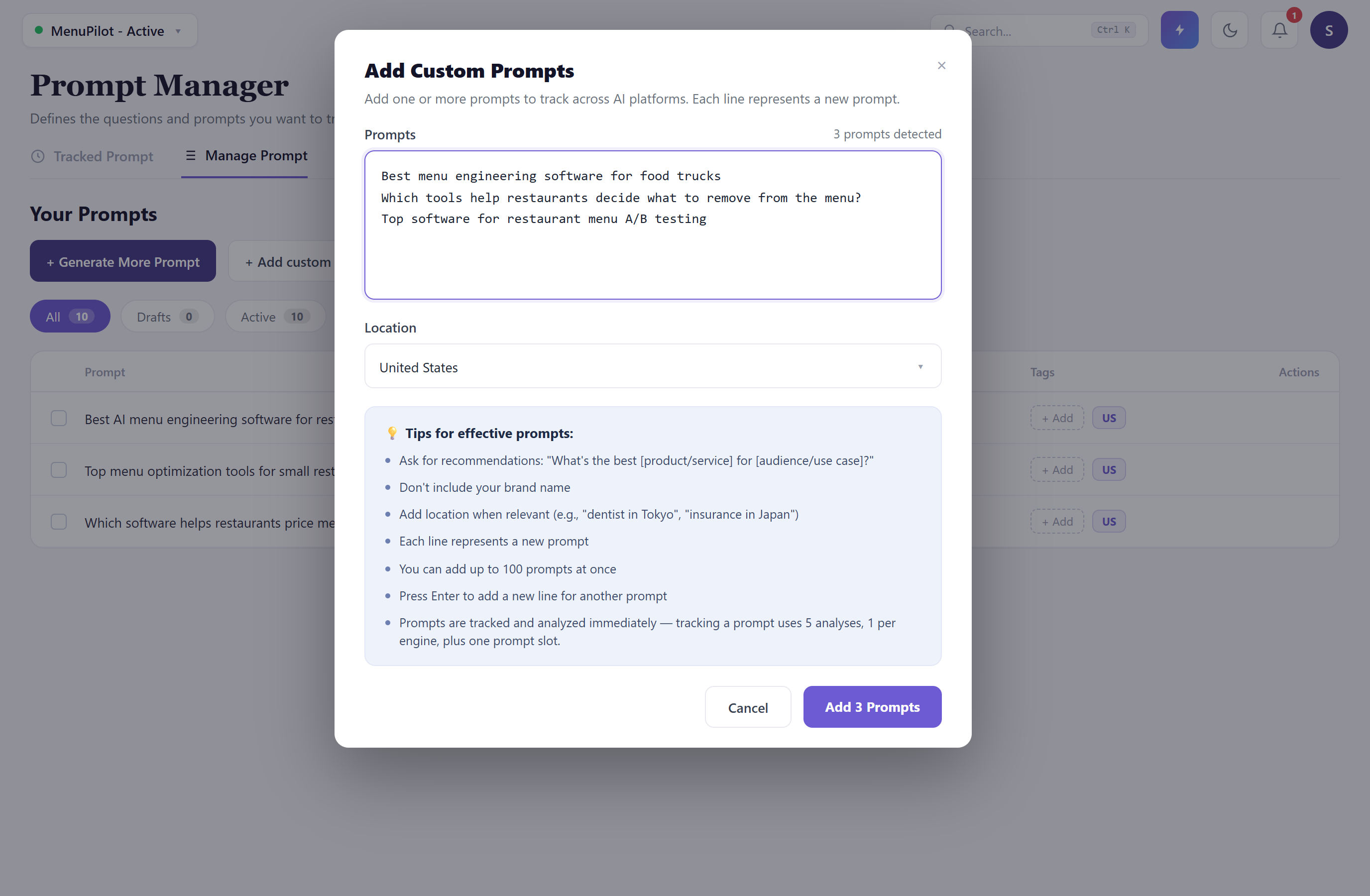
Because the brand-name trap in Type 3 is so easy to fall into, Zicy watches for it as you type: if a custom prompt contains your own brand name, you’ll see an inline warning right there, and you’ll have to acknowledge it before that prompt can be added. That’s a nudge, not a lock — but it’s there to stop a fake-win prompt from slipping into your set by accident.
Good sources for custom prompt ideas:
- The questions your sales team hears — “which tool is best for X” objections and comparisons, rewritten without brand names.
- Your niches — the generator writes broad prompts; you can add narrow ones like “best menu engineering software for food trucks.” Niche prompts often reveal blind spots broad prompts hide.
- Real buyer language — write the way customers talk, not the way your website talks. Buyers type “software to make my menu more profitable,” not “menu-engineering solution.”
Each prompt costs quota when activated, so quality beats quantity: 15 sharp prompts tell you more than 50 vague ones.
Use tags — future-you will thank you
Section titled “Use tags — future-you will thank you”Tags are labels you attach to prompts (like “menu-pricing” or “analytics”). They seem optional at first, but they unlock the most useful trick in Zicy: filtering every dashboard and analysis by topic. With tags, Sarah can answer “how visible are we in pricing conversations specifically?” instead of only seeing one blended average.
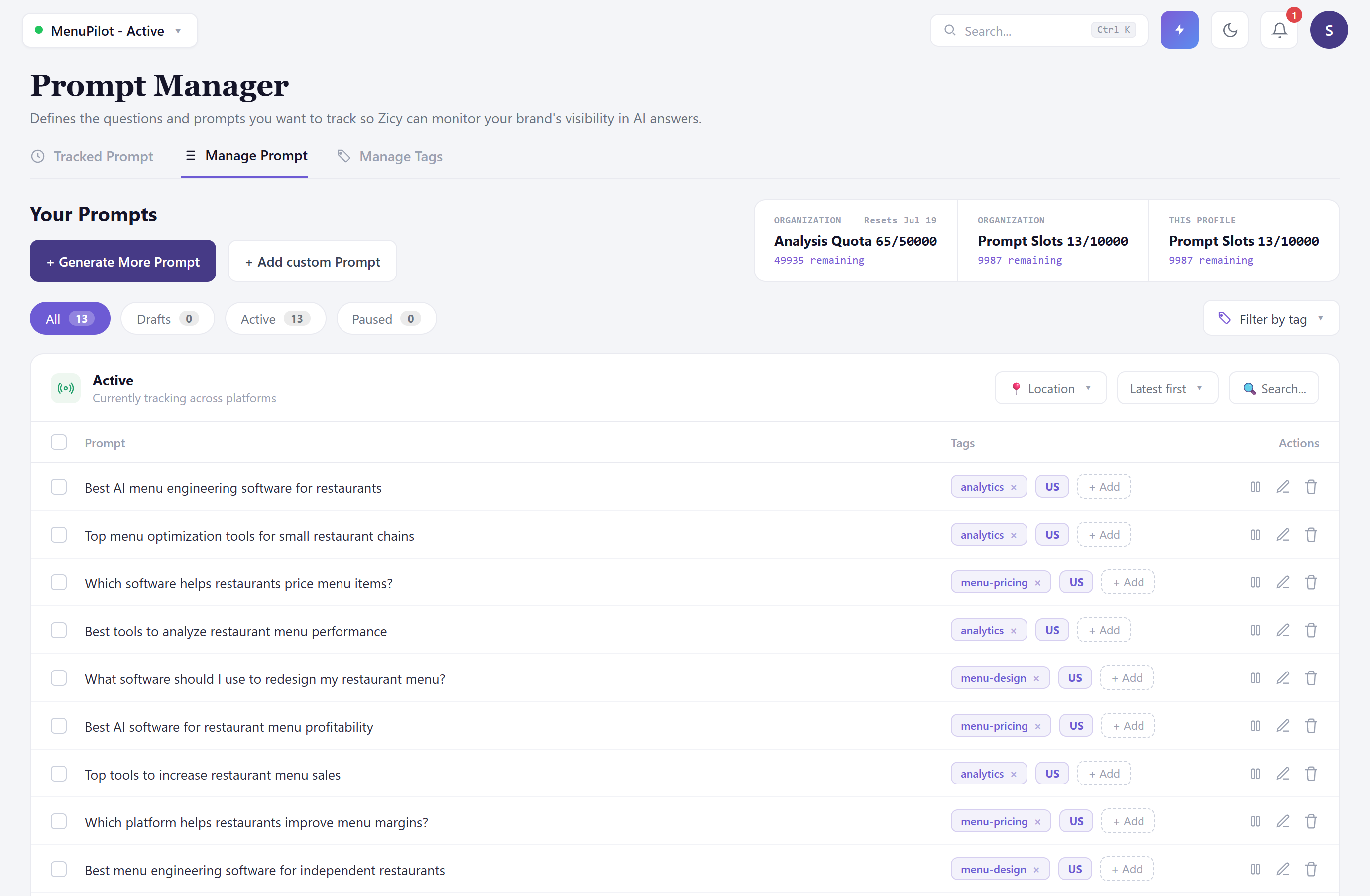
If you’ve never used tags, the Tag Library no longer starts as a blank wall — its empty state explains what tags are for and offers a one-click starter taxonomy, so you can drop in a sensible set of topic tags and adjust from there instead of inventing every label yourself. A simple system that works: give every prompt one location tag (Zicy adds these automatically when you set a location) and one topic tag from a short list — 3 to 6 topics is plenty.
Languages and locations
Section titled “Languages and locations”If you sell in more than one country or language, prompts can be generated per location and per language — a buyer in Germany asks a different question, in German, and gets different brands recommended. Track each market you actually sell in as its own tagged set of prompts, and you can compare markets with the tag filter.
Quick checklist before you activate
Section titled “Quick checklist before you activate”- No brand names in any prompt — yours or competitors’. ✅
- Every prompt is a choosing question, not a learning question. ✅
- Every prompt sounds like something a real buyer would type. ✅
- Every prompt has a topic tag. ✅
- You’re comfortable with the quota cost shown in the confirmation. ✅
Nothing starts tracking silently: your prompts are reviewed and you confirm them explicitly before they go active, so this checklist is your last look before you commit.
What to do next
Section titled “What to do next”- New to Zicy? Start with Setting Up Zicy for the First Time (GS-01).
- Unsure what a term means? See the Plain-English Glossary (GS-03).
- Want to see what your prompts produce? The Prompt Manager and Per-Prompt Results module articles walk through every screen.